Know exactly which devices, licenses, and components your organization possesses, who is responsible for them, and how they relate to your information systems. Everything is organized and searchable in one place.
Three types of assets, each tracked in its own way
Each type has its own fields but shares the same recognizable structure.
Assets
Physical equipment assigned to a contact person, business partner, or location.
GDPR Management System
For example: a laptop or a NAS system
Licenses
Software licenses, with a counter that tracks how many seats are currently in use. A license is linked to a user or an asset, making it immediately clear who or what is using it.
For example: an Office365 or Norton Anti-Virus license linked to a contact person
Components
Individual parts integrated into an asset. These can be both hardware and software components.
For example: a processor such as an i7 6700K or an operating system
How to set it up, tab by tab
Six tabs that together form the complete management of your assets, licenses, and components.
Categories
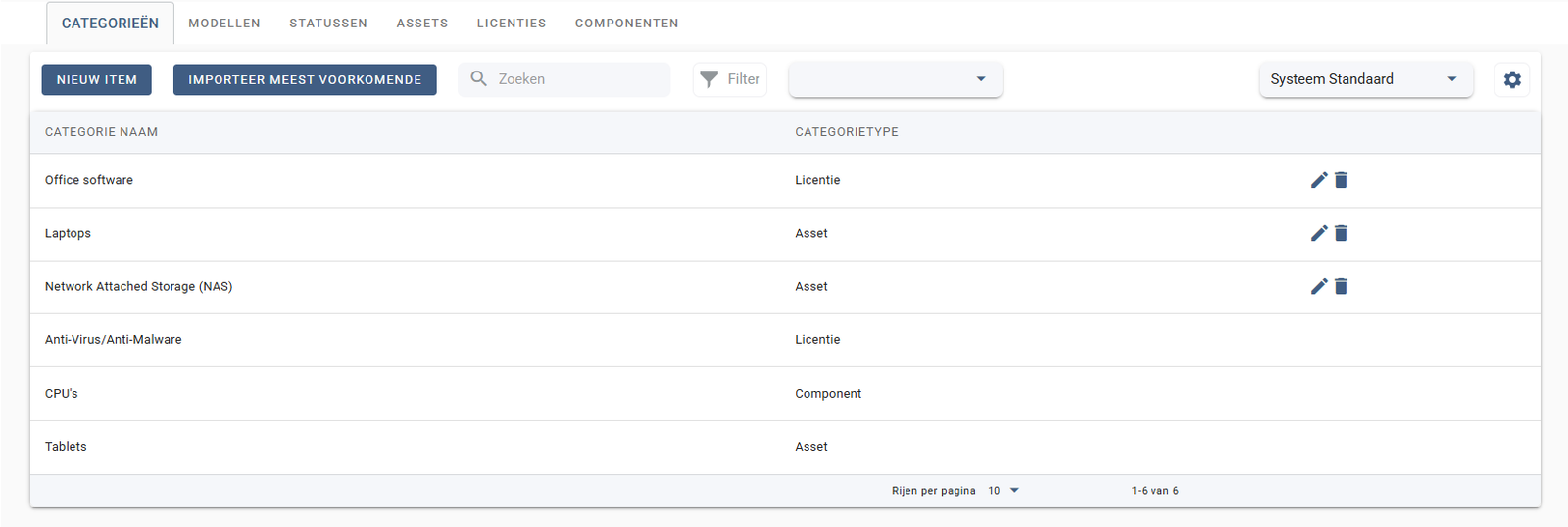
The starting point: each type of asset, license, or component is assigned a category, such as Laptops or Anti-Virus/Anti-Malware.
Models
A category is further detailed with specific models linked to a manufacturer, such as a Lenovo ThinkPad.
Statuses
Each asset has a status describing its current state, such as In Use.
Assets
The physical devices themselves, including manufacturer, model, name, to whom they are assigned, and the current status.
Licenses
Software licenses with license type, category, title, expiration date, and the number of seats already used.
Components
Individual parts such as processors, each with its own type and category.
Infra systems and information systems
Within Asset Management, you distinguish between the infrastructure itself and the systems running on it:
Infra systems
The technical infrastructure itself, such as servers and network equipment.
Information systems
The applications and software running on that infrastructure, such as Outlook365.
Linked to other features
Assign to a contact person
An asset is linked directly to the responsible person, as recorded in Contact Management.