Bring structure to your GDPR process by subdividing work into projects, phases, and tasks. You link each task directly to a responsible contact person, so it is always clear who is accountable for what and when something must be completed.
Projectmanagement kent drie niveaus. Elk project bestaat uit één of meer fasen, en elke fase bestaat uit concrete taken.
Niveau 1
Project
Het overkoepelende traject, bijvoorbeeld "NIS2-implementatie".
Niveau 2
Fase
Een onderdeel van het project, bijvoorbeeld "Verwerkingsregister opstellen".
Niveau 3
Taak
De concrete actie, toegewezen aan een contactpersoon met een vervaldatum.
Creating a task
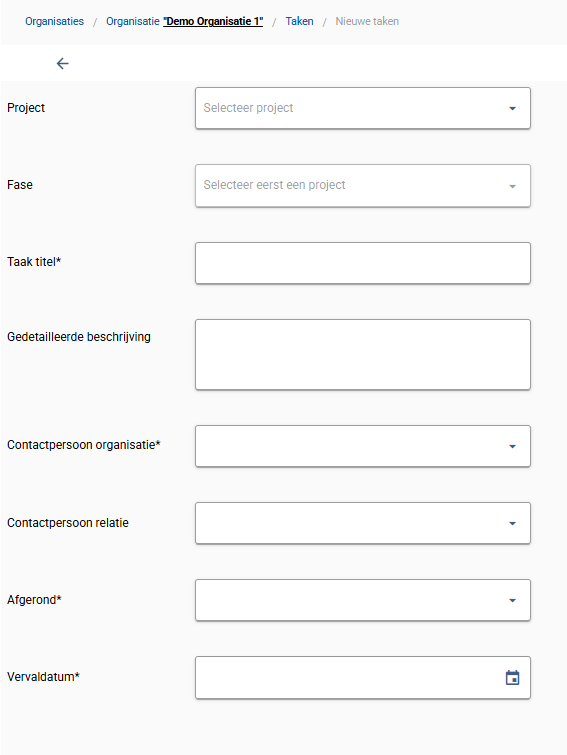
When creating a task, you fill in the following details. Fields marked with an * are mandatory.
Project
Choose a project…
Phase
Choose a phase…
Task title *
E.g. “Have data processing agreement signed”
Detailed description
Optional explanation of the task…
Organization contact person *
Choose a contact person…
Relation contact person
Choose a contact person…
Completed *
No
Due date *
mm-dd-yyyy
Linked to Contact Management
Every task is linked to an organization and/or relation contact person. You manage these contact persons — including their role and signing authority — in the Contact Management feature.